Here Are The 5 Reasons Everyone Is Buzzing About This New Keyboard for Your iPhone.

"I really enjoy my Clicks keyboard, as it allows me to accurately type long messages and is great especially when I am traveling for work."
Jules K.
Shop Now

1

The click, click, click of real buttons is just so satisfying.

Pressing real buttons and hearing that little clicking sound feels more natural and rewarding. It’s like ASMR for your fingers. You really need to feel it to believe it.

2

It’s an iPhone completely reinvented.

Every single button can be customized with shortcuts to your most frequent apps, contacts, and actions like, “Y” for YouTube, “N” for News, “C” for Camera, “R” for “Text Ryan”. No more swiping, tapping, and searching for the actions you take multiple times a day on your phone.

3

You get to see even more of your large, vibrant screen.

You don’t have a virtual keyboard covering 50% of your screen anymore. You now have the entire view for your reading, commenting and editing pleasure.

4

It will give you an edge. It’s your secret weapon, your superpower.

Don’t you hate having to wait until you are back at your computer to write longer emails or edit documents or content? You can make more happen right from your phone without your laptop being a ball and chain to get stuff done.

5

In a world of endless phones that all look the same, it’s ‘stand out’ charisma.

There are only so many ways to personalize your phone to your style and personality. Walking around with Clicks, people will literally snap their neck to stare at your phone, desperately wondering ‘what phone is that??’

Shop Clicks Keyboards.

Select your iPhone 17 model.
Select iPhone model & color.
iPhone 17 Pro
iPhone 17 Pro Max
iPhone 17
Select your color.
Onyx
Smoke
$139
US$159
Shipping date metafield text.
Add to cart
Out of stock
Leave your email to be notified when it's back in stock.
We’ll email you when your selected model is back in stock.
Oops, something went wrong. Try again.
Fall savings promo - our largest sale yet!
Available while quantities last.
Select your iPhone 16 model.
Select iPhone model & color.
iPhone 16 Pro
iPhone 16 Pro Max
iPhone 16
iPhone 16 Plus
iPhone 16e
Select your color.
Onyx
Spice
Surf
Royal Ink
Miami Beach
$139
US$159
Shipping date metafield text.
Add to cart
Out of stock
Leave your email to be notified when it's back in stock.
We’ll email you when your selected model is back in stock.
Oops, something went wrong. Try again.
Fall savings promo - our largest sale yet!
Available while quantities last.
Select your iPhone 15 model.
Select iPhone 15 model & color.
iPhone 15 Pro
iPhone 15 Pro Max
iPhone 15
iPhone 15 Plus
Select the color of your Clicks.
London Sky
BumbleBee
Royal Ink
Miami Beach
$139
US$159
Shipping date metafield text.
Add to cart
Out of stock
Leave your email to be notified when it's back in stock.
We’ll email you when your selected model is back in stock.
Oops, something went wrong. Try again.
Looking for regional keyboard layouts? Check out QWERTZAZERTY.
Select your iPhone 14 model.
Select iPhone 14 model & color.
iPhone 14 Pro
iPhone 14 Pro Max
Select the color of your Clicks.
London Sky
BumbleBee
$139
US$159
Almost gone - order now!
Add to cart
Out of stock
Leave your email to be notified when it's back in stock.
We’ll email you when your selected model is back in stock.
Oops, something went wrong. Try again.
Clicks for Pixel 9/9 Pro
From
US$139
Buy Now
Add to Cart
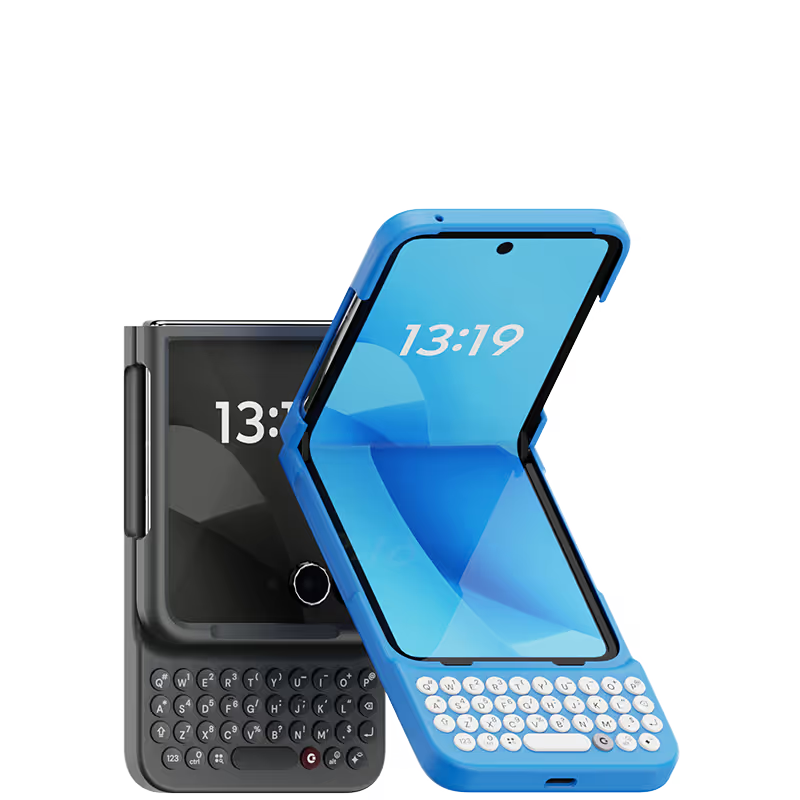
Clicks for Razr 2024
From
US$139
Buy Now
Add to Cart
New
Clicks for Razr 2025
From
US$139
Buy Now
Add to Cart

What Clicks users are saying.

Based on 5,328 user reviews.
Teo T.
Clicks for iPhone 14 Pro

As a long-time fan of physical keyboards and a former BlackBerry user, I was thrilled to discover the Clicks keyboard for iPhone. This innovative accessory brings back the tactile typing experience many of us have been missing in the era of touchscreen smartphones. **Design and Compatibility** The Clicks keyboard seamlessly combines the best of both worlds – the versatility of an iPhone with the satisfying feel of a physical keyboard. It's designed to work harmoniously with the iPhone, creating a nostalgic yet modern device that caters to those who crave tactile feedback while typing. **Typing Experience** While my typing speed hasn't significantly increased, I've noticed a marked improvement in accuracy. The physical keys allow for more precise input, reducing the frustration of autocorrect mishaps common with on-screen keyboards. As with any new input method, there is a learning curve, but I've found my proficiency improving week by week. **Standout Features** The most impressive aspect of the Clicks keyboard is its shortcut functionality. The ability to open specific apps directly from the locked screen is a game-changer, especially for users with numerous applications. This feature significantly streamlines the user experience, saving time and reducing the frustration of searching for the right app. **Customization and Accessories** To enhance the Clicks keyboard experience, I've made a couple of modifications: 1. Added a low-cost MagSafe ring to the back for convenient charging. 2. Improvised a holding band to improve grip and typing comfort. These small additions have further improved the usability of the device, making it even more tailored to my needs. **Learning Curve** It's worth noting that adapting to the Clicks keyboard may take a few weeks for some users. However, the investment in time pays off as typing speed and accuracy continue to improve with regular use. **Conclusion** For iPhone users who miss the tactile feedback of physical keyboards, the Clicks keyboard is a dream come true. While it may not dramatically increase typing speed, it offers improved accuracy, fantastic shortcut capabilities, and a nostalgic typing experience. With a bit of patience during the adaptation period, this accessory can significantly enhance your iPhone usage, especially if you're a heavy typer or app user. Reference Photos https://i.ibb.co/fNqRR2v/IMG-0022.jpg https://i.ibb.co/8gGbGzv/IMG-0023.jpg

Visit source
Will M.
Clicks for iPhone 15

Clicks is a lifesaver for remote work on the go. One of the most frustrating parts of working remote is still feeling glued to a laptop. If there's an urgent email or message I can respond from my phone but it can get tricky to accurately respond when I have to keep juggling reading the entire message or typing. Aside from any practical justification Clicks is just plain cool. It feels good to well click!

Visit source
Michael Hart
Clicks Keyboard for iPhone 16

It feels like the good ole days, using physical keys, and hearing that rhythmic click as I type. Tons of fun and much more comfortable to send long messages or emails!

Visit source
Matthew M.
Clicks for iPhone 15 Pro

Using the native iOS shortcuts and setting up custom ones in the Shortcuts is where the real power behind this accessory comes into play. It's also refreshing to have the entire display of my iPhone 15 Pro Max visible, instead of having a pop-up keyboard that consumes a third of the screen. I also hate the default iPhone keyboard, and find third party keyboards to be mostly an exercise in frustration. Lots of lessons have been learned in the process, and the folks at Clicks truly brought their expertise and attention to detail with the design and build of the Clicks Keyboard. It is now an essential accessory for me, and I continue to figure out ways to make it better on a regular basis. If you miss the physical keyboard on devices like the Blackberry, this accessory is well worth the cost.

Visit source
Estu K.
Clicks for iPhone 15 Pro

This is the ultimate case for an iPhone power-user or techno-addict. The ability to customize the keyboard integrated with Shortcuts is superb. Increased usable screen space is quite useful.

Visit source
Oliver J A
Clicks Keyboard for iPhone 16

I absolutely love the tactility of Clicks Keyboard. Brings me back to my BlackBerry days, but with more technological capabilities. Prior to purchasing the keyboard I had an iPhone 12. I loved the aesthetics of the keyboard so much that I upgraded to the 16 Pro just so I can have a keyboard. Love my Clicks!

Visit source
bobby montemayor
Clicks Keyboard for Razr+ (2024)

Such a nostalgic piece of equipment! I am in Love with this product! Everyone asks about, turns heads and is an ice breaker. My friends liked it so much they purchased their own for their Razor phones as well! Fantastic job guys y'all nailed it!

Visit source
Kyle H.
Clicks for iPhone 15

Customer service, shipping time frame, and their carrier to get shipments to USPS suck. With that being said, typing on this keyboard is 100% worth it. I was so bored with my iPhone but hate the android operating system. This keyboard has made me the it girl and I am serving 2000s chic.

Visit source
Kris Hosking
Clicks Keyboard for iPhone 14

Love love love my clicks case ! Texts and emails are sooooo easy and I love the keys and I have fat thumbs

Visit source
David E.
Clicks for iPhone 16 Pro

Attention, tech enthusiasts and keyboard warriors! Remember the nostalgic days of tactile typing on your mobile phones? The satisfying clickety-clack that accompanied every text message, email, and hastily written note? Relive those moments with Clicks for iPhone, a resurrection of the lost art of physical keyboarding. As a seasoned veteran of the mobile phone scene, I've witnessed the rise and fall of countless trends, but few have intrigued me like Clicks. This ingenious little add-on empowers you to transform your sleek touchscreen iPhone into a pocket-sized productivity powerhouse, enhancing your efficiency on the go. The Clicks keyboard is a marvel of engineering, with well-spaced keys that provide just the right amount of tactile feedback. Typing on it is like typing on a miniature laptop, but without the bulk or the awkward stares from fellow commuters. Sure, it takes a bit of getting used to. My thumbs initially felt like a fish out of water, flopping around in search of their digital home. But after a few days of practice, I was zipping through emails and social media posts with newfound speed and accuracy. And let's remember the sheer joy of hearing that satisfying click with every keystroke. It's a symphony of productivity, a rhythmic reminder that you're getting things done. Of course, there are a few minor quibbles. The Clicks keyboard adds a bit of bulk to your iPhone and makes it longer. But for those of us who prioritize function over fashion, these are minor sacrifices. So, if you're tired of hunting and pecking on your touchscreen keyboard or simply yearning for the tactile typing experience of yesteryear, give Clicks for iPhone a try. Your thumbs will thank you.

Visit source
Free standard shipping
When you buy at Clicks.tech, your Clicks Keyboard will ship next day.
Easy returns
Try Clicks for 30 days. Return it no questions asked.
1-year warranty
We’ll replace your Clicks Keyboard free for one year if there’s a defect.

30 Day Trial - The Clicks Promise.

We have poured thousands of hours into building a keyboard that we truly believe will transform how you use your iPhone every day.

We ask that you give Clicks a solid try for at least 14 days, and if you don't like it for whatever reason, you can return it for a full refund within 30 days.
Clicks Keyboard: The Ultimate Guide
Unlock the full potential of your iPhone with Clicks, the ultimate keyboard case designed for productivity and style. In this video, we cover everything you need to know about Clicks.