

4 interest-free installments with Affirm.
Free standard shipping.
30-day return policy. Try Clicks risk-free.
1-year warranty with all Clicks Keyboards.
Free standard shipping.
30-day return policy. Try Clicks risk-free
1-year warranty with all Clicks devices.
Based on 5,000+ reviews.

Your phone is better with buttons.

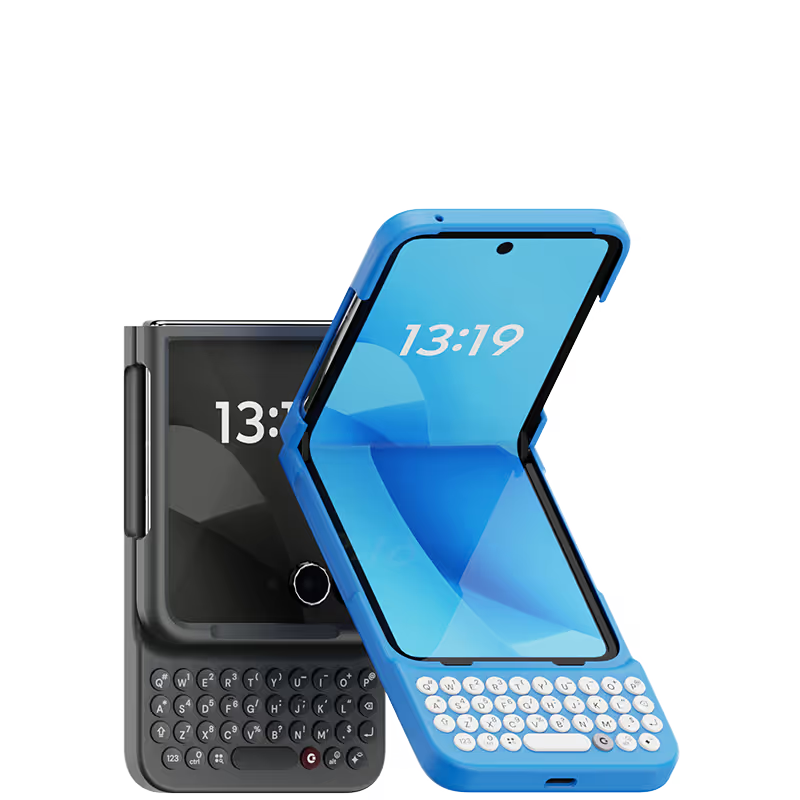
Premium, protective case that gives your phone superpowers.
Now available for Pixel, Razr, & Galaxy.

30 Day Test Drive
Free Shipping On $99+ Orders
1 Year Warranty
Learn more

5 Reasons Why You'll Love Clicks.

1.

Feel satisfying real buttons
Pressing real buttons and hearing that little clicking sound feels more natural and rewarding.

2.

Elevated premium protection
Brushed metal side keys, a microfibre lining, and a new enclosure that feels great while adding protection inside and out.

3.

See more screen
Free your screen, with 50% more usable display to work, play, surf, chat and engage with your content.

4.

Take action, faster
Launch customized shortcuts to Google apps and Gemini at the push of a button.

5.

Keep your laptop at home
Make more happen right from your phone without needing to crack open your laptop. 

Unlock Powerful Productivity.

A smarter way to work and connect, at your fingertips.

Premium, Protective Design

Charge As Normal

Backlit Keys

Shop Clicks Keyboards.

Select your color.
Onyx
$139
US$159
Shipping date metafield text.
Add to cart
Out of stock
Leave your email to be notified when it's back in stock.
We’ll email you when your selected model is back in stock.
Oops, something went wrong. Try again.
Fast & Free Shipping on orders $99+
No Extra Costs
30-Day Return Policy
Try Clicks Risk-Free
Over 100,000 Clicks Sold
In 100+ Countries
Select your color.
Clicks for Razr supports Razr+, Razr (2024), Razr 50, Razr 50 Ultra.
Onyx
$139
US$159
Shipping date metafield text.
Add to cart
Out of stock
Leave your email to be notified when it's back in stock.
We’ll email you when your selected model is back in stock.
Oops, something went wrong. Try again.
Fast & Free Shipping on orders $99+
No Extra Costs
30-Day Return Policy
Try Clicks Risk-Free
Over 100,000 Clicks Sold
In 100+ Countries
Select your Razr 2025 model.
Select Razr 2025 model & color.
Razr Ultra
For Razr Ultra & Razr 60 Ultra
Razr Plus (2025)
For Razr Plus (2025)
Razr (2025)
For Razr (2025) & Razr 60
Select your color.
Onyx
$139
US$159
Shipping date metafield text.
Add to cart
Out of stock
Leave your email to be notified when it's back in stock.
We’ll email you when your selected model is back in stock.
Oops, something went wrong. Try again.
Fast & Free Shipping on orders $99+
No Extra Costs
30-Day Return Policy
Try Clicks Risk-Free
Over 100,000 Clicks Sold
In 100+ Countries

Buttons with benefits.

Premium Typing Experience

Type with speed and confidence on a real keyboard that provides satisfying tactile feedback.

More Screen

Get 50% more usable display to work, play, surf, chat and engage with your content.

Take Action

Launch apps and control your phone at the push of a button with customizable keyboard shortcuts.

Clicks for Android

Clicks for Android

Clicks has you covered.
Try for 30 days.

It takes a week or two to get used to typing on real buttons –  you’ll need a little bit of patience and perseverance. Trust our tens of thousands of customers, it’s so worth it!

If it’s just not for you, we’ll give you your money back, no questions asked. 

Available for Pixel 9/9 Pro, Razr+ and Galaxy S25
in multiple colors and premium materials.

New
Clicks for Pixel 9/9 Pro, Surge
From
US$139
Buy Now
Add to Cart
New
Clicks for Pixel 9/9 Pro, Onyx
From
US$139
Buy Now
Add to Cart
New
Clicks for Razr 2024
From
US$139
Buy Now
Add to Cart
New
Clicks for Razr 2025
From
US$139
Buy Now
Add to Cart

Shopping for Clicks for iPhone too?

Clicks Keyboards are also available for iPhone 16/15/14.

If you have an iPhone friend who would love Clicks, pick one up for them too! 

Shop Clicks for iPhone

Clicks has you covered.

Free shipping on orders $99+
When you buy at Clicks.tech, your Clicks Keyboard will ship next day.
Easy returns
Try Clicks for 30 days. Return it no questions asked.
1-year warranty
We’ll replace your Clicks Keyboard free for one year if there’s a defect.

What Clicks users are saying.

Based on 5,328 user reviews.
Damien ahuir
Clicks Keyboard for Pixel 9/9 Pro

Perfect, even if it states that it is for a pixel 9 pro I took my chances and it fits perfectly my pixel 10 pro. I couldn't be happier.

Visit source
Christian CHARLES
Clicks Keyboard for Pixel 9/9 Pro

Very nice product and easy to use after a short learning period.

Visit source
Teo T.
Clicks for iPhone 14 Pro

As a long-time fan of physical keyboards and a former BlackBerry user, I was thrilled to discover the Clicks keyboard for iPhone. This innovative accessory brings back the tactile typing experience many of us have been missing in the era of touchscreen smartphones. **Design and Compatibility** The Clicks keyboard seamlessly combines the best of both worlds – the versatility of an iPhone with the satisfying feel of a physical keyboard. It's designed to work harmoniously with the iPhone, creating a nostalgic yet modern device that caters to those who crave tactile feedback while typing. **Typing Experience** While my typing speed hasn't significantly increased, I've noticed a marked improvement in accuracy. The physical keys allow for more precise input, reducing the frustration of autocorrect mishaps common with on-screen keyboards. As with any new input method, there is a learning curve, but I've found my proficiency improving week by week. **Standout Features** The most impressive aspect of the Clicks keyboard is its shortcut functionality. The ability to open specific apps directly from the locked screen is a game-changer, especially for users with numerous applications. This feature significantly streamlines the user experience, saving time and reducing the frustration of searching for the right app. **Customization and Accessories** To enhance the Clicks keyboard experience, I've made a couple of modifications: 1. Added a low-cost MagSafe ring to the back for convenient charging. 2. Improvised a holding band to improve grip and typing comfort. These small additions have further improved the usability of the device, making it even more tailored to my needs. **Learning Curve** It's worth noting that adapting to the Clicks keyboard may take a few weeks for some users. However, the investment in time pays off as typing speed and accuracy continue to improve with regular use. **Conclusion** For iPhone users who miss the tactile feedback of physical keyboards, the Clicks keyboard is a dream come true. While it may not dramatically increase typing speed, it offers improved accuracy, fantastic shortcut capabilities, and a nostalgic typing experience. With a bit of patience during the adaptation period, this accessory can significantly enhance your iPhone usage, especially if you're a heavy typer or app user. Reference Photos https://i.ibb.co/fNqRR2v/IMG-0022.jpg https://i.ibb.co/8gGbGzv/IMG-0023.jpg

Visit source
Alexandre I.
Clicks for iPhone 15 Pro

Loved the case once used to it, i became addicted

Visit source
James Humbane
Clicks Keyboard for iPhone 17

The Clicks Keyboard is absolutely amazing! I bought the Onyx & Smoke white for my 17 Pro Max. Typing experience is fun again and the tactile feel of the keyboard is priceless.

Visit source
Ivar M.
Clicks Keyboard for Pixel 9/9 Pro

Especially in the cold, typing on a touch screen for longer periods of time makes my input gradually less accurate. I have yearned for a BlackBerry revival, and Clicks for my Pixel 9 has been a close second. It took a few days getting used to the long phone form factor, but after that it was smooth sailing.

Visit source
Michael L.
Clicks for iPhone 14 Pro

If you do a lot of typing on your iPhone, this keyboard is a must-have. It's so much easier and more comfortable to type on than the tiny on-screen keyboard. The buttons are well-spaced and have a nice tactile feedback. The keyboard also pairs easily with my iPhone and connects quickly. Overall, I'm very impressed with this product.

Visit source
Clive H.
Clicks for iPhone 15

Great product, but unfortunately the keys and balance doesn’t work well well for me. I would also like the keyboard to be heavier or weighted. It made the phone too long and floppy. My hands have some flexibility limitations, so the product just wasn’t right for me. A modified case with a battery bump, under the keyboard and extending towards the top of the phone, might help the phone’s holding balance with the additional benefit of an external battery pack. Just a thought for a future version.

Visit source
Luis I.
Clicks for iPhone 15

I tend to watch much reviews and focus on negative reviews prior to buying any products. For the Clicks keyboard, some of the major concerns people have was that the product is gimmicky (not too much value), the weight distribution is an issue and the lack of MagSafe support. As an avid Blackberry user - even going back to the days of Sidekick and the Voicestream 3way V100 device (yikes! that old)...I have enjoyed using tactile buttons on a smart device. The Blackberry I used was the Blackberry Key2...which I enjoyed but am biased to my Apple ecosystem, so the Key2 had limited used except for business use. I was skeptical about the Clicks keyboard considering its founders were heavily invested in the Blackberry seen; thus meaning there was an emotional, nostalgic investment towards the products (not solely because it addressed an issue in the smart phone world). Anyways, after fighting resistance and opting to buy, I am more than satisfied with my purchase. The learning curve was more of a trip down memory lane as missteps (or missed taps keys) experienced during the first two weeks are not noticeable after a month of use. I can even type while not looking down and concentrating on my sports on the big screen. An act I was not able to fulfill since my days of using the Blackberry Bold and Sidekick. Even as much as I enjoyed my Blackberry Passport, I did find the keys too far apart while the Blackberry Key2 keys were too thin. While these keys tend to be smaller than I preferred, it is a conceded tradeoff that we must accept nowadays considering the smaller widths of phones. Noticeable benefits: I rarely take it out of the case. I was going to assume because of its size and lack of MagSafe, I was only going to use it during work hours to power through on emails. I find myself rarely taking it off and writing more social media posts on it. The top-heavy concern is not that much of an issue as I am already used to hold my phone is such a manner when typing on a virtual keyboard anyway. Now, typing on a tactile keyboard, it seems much more satisfying feeling my tips press on buttons knowing I am actually hitting a key - much like a keyboard. That sensation "tricks" my brain into knowing that I did not miss a key and I can concentrate much quicker on the next key or word, rather than continuously glancing on what I wrote to see if there are any errors on my sentence. The only draw back is the lack of MagSafe. For charging, it is not much of an issue as I can easily plug a USB-C wire or even lay it on top of a Qi Wireless charging puck. However, my daily wallet is MagSafe and I do see myself carrying it less. Thankfully, with Apple Wallet, most of my cards, IDs and commuter passes are all stored electronically so I do not need to have my physical wallet at my possession at all times. So, overall, I am highly satisfied with the product and glad I purchased it.

Visit source
Imported i.
Clicks for iPhone 15 Pro

This is an incredible piece of techno-art! Makes typing wonderfully tactile but also makes your phone a beautiful and unique talking piece!!! And ... it really maximizes screen size!

Visit source