Black Friday ends soon! Save up to 63%!
Shop now

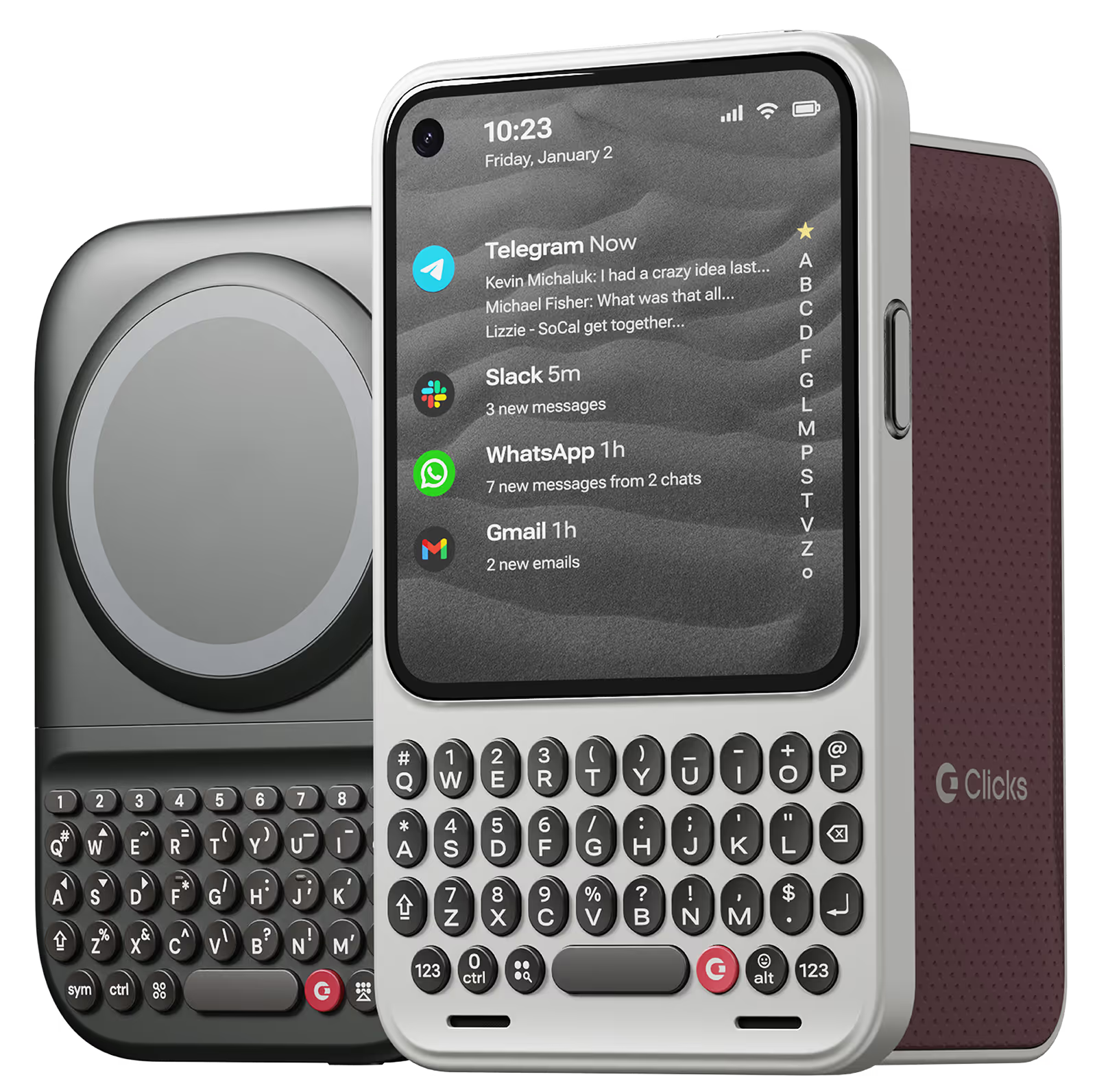
Why you'll love Clicks.

1
Feel satisfying real buttons
Pressing real buttons and hearing that little clicking sound feels more natural and rewarding.
Replay
2
Elevated premium protection
Brushed metal side keys, a microfibre lining, and a new enclosure that feels great while adding protection inside and out.
Replay
3
See more screen
Free your screen, with 50% more usable display to work, play, surf, chat and engage with your content.
Replay
4
Take action, faster
Launch customized shortcuts at the push of a button. Personalize your keyboard to control your home, launch apps, text or call contacts.
Replay
5
Keep your laptop at home
Make more happen right from your phone without needing to crack open your laptop.
Clicks for iPhone
Available for iPhone 16, 15 and 14.
In stock & shipping now.
Buy Now
Clicks for Pixel
Pixel-perfect productivity.
Available now.
Buy Now
Clicks for Razr
Pocket-sized. Power-packed.
Available now.
Buy Now

Buttons with benefits.

More Screen

Get 50% more usable display to work, play, surf, chat and engage with your content.

Customizable Shortcuts

Launch custom actions at the push of a button.

Powerful Productivity

Real buttons that help you work smarter while away from your desk.

What Clicks users are saying.

Based on 5,328 user reviews.
Immanuel vinodh Anthony
Clicks Keyboard for iPhone 16

It brings back the experience of using the keypad phone along with the sound, I love it

Visit source
Lilly W.
Clicks for iPhone 14 Pro

there is a learning curve and getting your muscle memory will take time but as a former blackberry lover i knew what i was getting into. i have the 14 pro max and it does make my phone huge but it’s always in my hand or my purse so it doesnt bother me much. love being able to use the keyboard to run shortcuts

Visit source
Emily G.
Clicks for iPhone 14 Pro

If you do a lot of typing on your phone, this keyboard case is a game-changer. It's like having a mini laptop in my pocket. The buttons are comfortable and responsive, and the layout is intuitive.

Visit source
Heidi C.
Clicks for iPhone 16

I've had this almost an entire month by this point, and I love being able to touch type on my phone again <3 It's definitely worth every penny, in my opinion. I would absolutely purchase this again, and I would recommend this purchase to others. That being said, there are a couple of improvements that could be made, which is why I am leaving 4 stars instead of 5. 1 ) Sometimes the buttons on the left side (Q, A, Upper Case, 123) get stuck for a bit. I am unsure if this is a user error or a design error. 2) I do wish the case had a bit of weight behind the keyboard itself - it took a couple of weeks to get used to how top heavy the phone feels in this case. 3) I wish the keyboard was a full keyboard - I use the '+' symbol a lot, and it's annoying to have to remember to use the specific "keyboard up" key rather than the world "emoji" key to get the on screen keyboard. A full keyboard has a "+" sign already. I understand why Clicks doesn't have a full keyboard - the phone would be hella long with it, I suppose. 3.1) Alternatively, it would be awesome if I could create custom keystrokes using the clicks key + another key on the keyboard. This would allow the option of having/using additional special characters customized to each user.

Visit source
Matthew M.
Clicks for iPhone 15

Using the native iOS shortcuts and setting up custom ones in the Shortcuts is where the real power behind this accessory comes into play. It's also refreshing to have the entire display of my iPhone 15 Pro Max visible, instead of having a pop-up keyboard that consumes a third of the screen. I also hate the default iPhone keyboard, and find third party keyboards to be mostly an exercise in frustration. Lots of lessons have been learned in the process, and the folks at Clicks truly brought their expertise and attention to detail with the design and build of the Clicks Keyboard. It is now an essential accessory for me, and I continue to figure out ways to make it better on a regular basis. If you miss the physical keyboard on devices like the Blackberry, this accessory is well worth the cost.

Visit source
Kris H.
Clicks for iPhone 14 Pro

what a game changer improved screen size and typing like a wizard !

Visit source
裕樹 前.
Clicks for iPhone 15

なれるまで大変だけど、とにかくカッコイイ!!

Visit source
Ralph S.
Clicks for iPhone 15

for the generation that grew up with blackberry and physical keyboards, Clicks is a Godsend! I have missed typing without looking at the screen or they keys, and I’m getting there! A few more weeks I suppose! And definitely starts a few conversations when they see my pull my phone out to type!

Visit source
Robbie
Clicks for iPhone 15

I have to say, as much as I was looking forward to this case, it still surprised me. I was blown away in the first hour. The keys feel great. The placement it borderline perfect. Honestly, I was worried that my 15 Pro Max would feel top heavy but I really having seen an issue with weight distribution. The whole package is really solid. I am not in love with the fact that I will have to put an magnet ring on it in order to get mag-safe to work but heck, nothing is perfect. Good Job Clicks.

Visit source
Pascale B.
Clicks for iPhone 15

As a diehard blackberry user, Clicks is the only thing that can make me use an iPhone. The experience is fantastic.

Visit source

Clicks has you covered.
Try for 30 days.

It takes a week or two to get used to typing on real buttons –  you’ll need a little bit of patience and perseverance. Trust our tens of thousands of customers, it’s so worth it!

If it’s just not for you, we’ll give you your money back, no questions asked.