Clicks Keyboard for iPhone

Your iPhone is better with buttons.

Buy Now
Buy Now
Loved by thousands of fast-typing fingers worldwide.

Shop Clicks Keyboards.

Select your iPhone 17 model.
Select iPhone model & color.
iPhone 17 Pro
iPhone 17 Pro Max
iPhone 17
Select your color.
Onyx
Smoke
$139
US$159
Shipping date metafield text.
Add to cart
Out of stock
Leave your email to be notified when it's back in stock.
We’ll email you when your selected model is back in stock.
Oops, something went wrong. Try again.
Fall savings promo - our largest sale yet!
Available while quantities last.
Select your iPhone 16 model.
Select iPhone model & color.
iPhone 16 Pro
iPhone 16 Pro Max
iPhone 16
iPhone 16 Plus
iPhone 16e
Select your color.
Onyx
Spice
Surf
Royal Ink
Miami Beach
$139
US$159
Shipping date metafield text.
Add to cart
Out of stock
Leave your email to be notified when it's back in stock.
We’ll email you when your selected model is back in stock.
Oops, something went wrong. Try again.
Fall savings promo - our largest sale yet!
Available while quantities last.
Select your iPhone 15 model.
Select iPhone 15 model & color.
iPhone 15 Pro
iPhone 15 Pro Max
iPhone 15
iPhone 15 Plus
Select the color of your Clicks.
London Sky
BumbleBee
Royal Ink
Miami Beach
$139
US$159
Shipping date metafield text.
Add to cart
Out of stock
Leave your email to be notified when it's back in stock.
We’ll email you when your selected model is back in stock.
Oops, something went wrong. Try again.
Looking for regional keyboard layouts? Check out QWERTZAZERTY.
Select your iPhone 14 model.
Select iPhone 14 model & color.
iPhone 14 Pro
iPhone 14 Pro Max
Select the color of your Clicks.
London Sky
BumbleBee
$139
US$159
Almost gone - order now!
Add to cart
Out of stock
Leave your email to be notified when it's back in stock.
We’ll email you when your selected model is back in stock.
Oops, something went wrong. Try again.

Take a closer look.

Elevated input.

The best mobile keyboard yet, ergonomically designed to help you type faster, longer and more accurately.

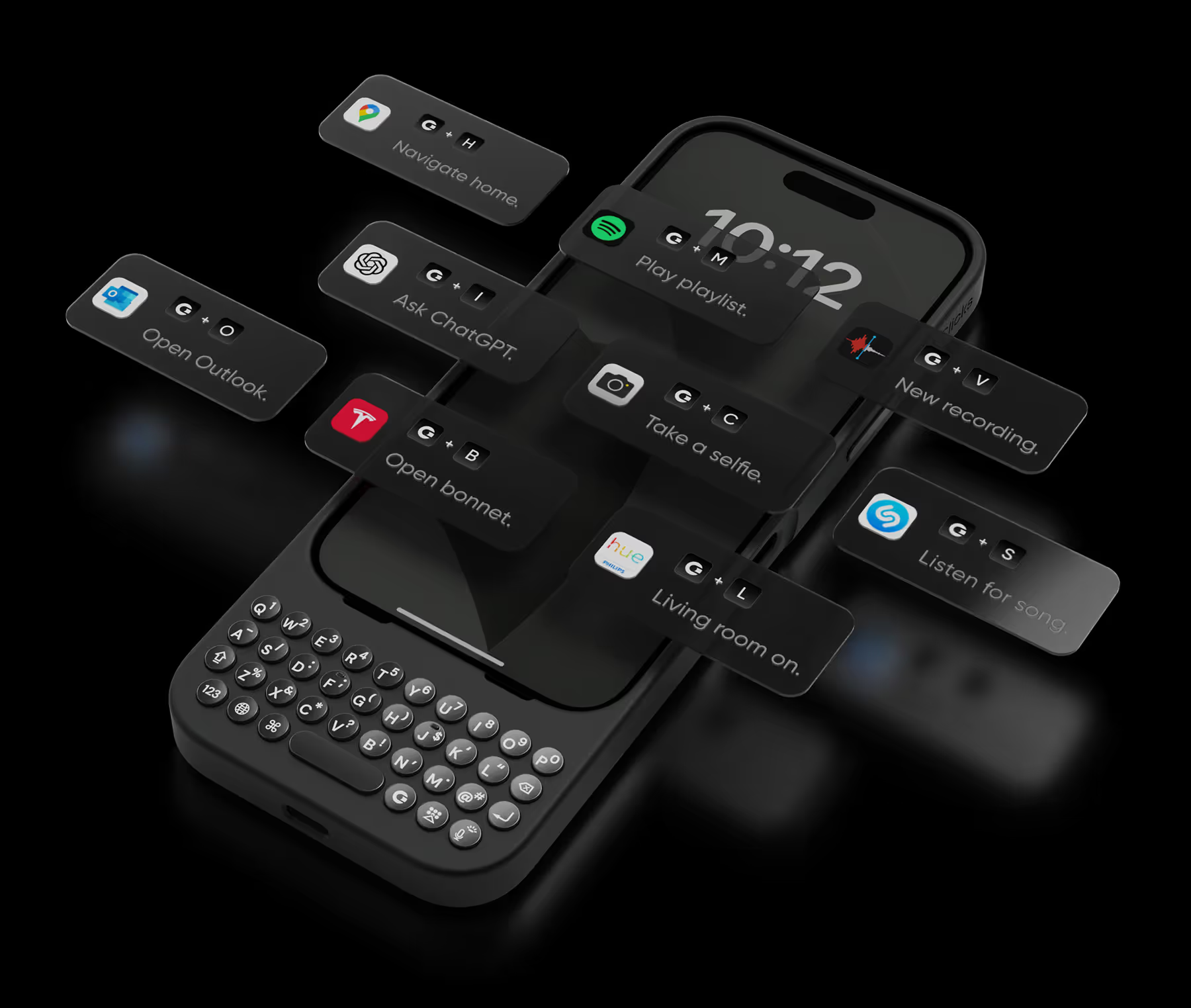
Take action.

Launch Apple Shortcuts at the push of a button. Personalize your keyboard to control your home, take actions, launch apps, and more.
+
T
Open bonnet.
+
L
Living room on.
+
A
Ask ChatGPT.
+
T
Open bonnet.
+
L
Living room on.
+
A
Ask ChatGPT.
+
T
Open bonnet.
+
L
Living room on.
+
A
Ask ChatGPT.
+
S
Listen for song.
+
C
Take a selfie.
+
M
Play emails.
+
S
Listen for song.
+
C
Take a selfie.
+
M
Play emails.
+
S
Listen for song.
+
C
Take a selfie.
+
M
Play emails.
+
V
Record voice.
+
P
Play playlist.
+
N
Navigate home.
+
V
Record voice.
+
P
Play playlist.
+
N
Navigate home.
+
V
Record voice.
+
P
Play playlist.
+
N
Navigate home.

See more. Say more.

Free your screen, with 50% more usable display to work, play, surf, chat and engage with your content.

Stay connected.

With built in support for MagSafe, USB-C data transfer, and pass through charging, Clicks works with your existing ecosystem.

No light?
No problem.

Backlit keys and customizable keyboard brightness make it easy to burn the midnight oil without losing sight of what you’re saying.

Unlock extra features
with the Clicks app.

The Clicks App for iPhone makes it easy to manage your keyboard settings, unlock new features and keep your Clicks keyboard updated with the latest features.
Adjust backlight settings.
Unlock additional setting controls.
Free software updates.

Clicks has you covered.

Free standard shipping
When you buy at Clicks.tech, your Clicks Keyboard will ship next day.
Easy returns
Try Clicks for 30 days. Return it no questions asked.
1-year warranty
We’ll replace your Clicks Keyboard free for one year if there’s a defect.

Compare Clicks Keyboard models.

Clicks Keyboard for iPhone 16

Clicks Keyboard for iPhone 15

Clicks Keyboard for iPhone 14

Premium Keyboard Experience
Backlit Keyboard
Clicks Mode
MagSafe Compatible
New Ergonomic Sculpted Keys
USB-C Data Mode
Models Supported
16 Pro Max
16 Pro
16 Plus (coming soon)
16 (coming soon)
15 Pro Max
15 Pro
15 Plus
15
14 Pro Max
14 Pro
Connectivity
USB-C (Charging + Data)
USB-C (Charging)
Lightning (Charging + Data)
Colors

What Clicks users are saying.

Based on 5,328 user reviews.
Barb Jones
Clicks Keyboard for iPhone 15 plus

The phone case is great especially with the keyboard. I did have a problem where mine stopped working I contacted them and it was under warranty for at least a year and it was under a year old and they were great. They were very responsive their small company so you have to be patient but they will get back with you via email but it’s a great little keyboard case it’s a little big obviously but it’s nice cause you get your whole screen and the ability to use a regular keyboard instead of a virtual very pleased with this company and I would recommend this product to anybody that wants a standard keyboard

Visit source
Hayley K.
Clicks for iPhone 16 Pro

I could not be more happy with my clicks keyboard. After hanging on to my BlackBerry Keyone for too long, I did not want to let go of my qwerty keyboard & actually get used to typing on a touch screen. I searched & search but could not find an upto date replacement. Then I came across clicks, it wasn’t even due out for months, but I got an iPhone 15 only because of clicks coming out, sure, I had to type with a touch screen for maybe a year but totally worth it. If you love buttons & loved your BlackBerry, Clicks will not disappoint. Can’t rate enough. 10/10,

Visit source
Alexandra M.
Clicks for iPhone 15 Pro

I can't express how much I love using the "Clicks" keyboard attachment for my iPhone! As someone who types a lot on my phone, the tactile feedback of physical keys has been a game-changer. The "Clicks" keyboard seamlessly integrates with my iPhone and it is ready to use. However, what sets "Clicks" apart is its convenience. It attaches effortlessly to my iPhone, and I can easily carry it with me wherever I go. Whether I'm typing emails, working on documents, or chatting with friends, the "Clicks" keyboard has significantly improved my productivity and typing experience. I also appreciate the thoughtful design of "Clicks". It looks sleek and modern, complementing the aesthetics of my iPhone and the battery life is impressive, lasting through long typing sessions without needing a charge Overall, "Clicks" has made my iPhone more versatile and enjoyable to use. It's a must-have accessory for anyone who values efficiency and comfort in their mobile typing experience. I wholeheartedly recommend "Clicks" to all iPhone users!

Visit source
Prisco S.
Clicks for iPhone 15 Pro

The excitement of having a physical keyboard died down a bit when I realized that the backlight was not very bright for me. So I contacted Clicks and a week later, Clicks updated their app to enable customization of their physical keyboard.

Visit source
Noah J.
Clicks for iPhone 15 Pro

I wasn't sure how much I'd use the shortcut buttons on the Clicks keyboard, but they've become a game-changer. With a single tap, I can instantly launch my favorite apps or activate voice dictation. It's a huge time-saver, especially when multitasking on my iPhone. Plus, the backlighting makes late-night typing a breeze.

Visit source
Guy d.
Clicks for iPhone 15

I have been very pleased with the keyboard. Takes a bit of getting used to - but is worth the brain effort. Lots of comments from colleagues and friends, 95% positive.

Visit source
Milan K.
Clicks for iPhone 15

I finally feel free again When BlackBerry ceased to exist as a phone, my world fell apart. I just couldn't pull myself together anymore. Now that the iPhone keyboard has appeared, I have regained hope that organization will reign again in the world.

Visit source
Skyler K
Clicks for iPhone 14

I am writing this review with my clicks keyboard on my iPhone 14 Pro. This keyboard has changed everything, love that it gives me more screen with the clicks keyboard. I added a MagSafe adapter to make this phone fully MagSafe compatible with all my accessories. The keyboard has a great tactile feeling when typing and its not about wanting to go back to the old days, its about realising how much a physical keyboard makes your everyday smartphone more useful and productive that only a physical keyboard can offer. I have large hands and I’ve learned to type with my clicks no issues I love the the backlighted keyboard which makes life so much easier! I can not wait for clicks team to build the clicks brand into something even bigger and offer more click products like a case that slides or flips open as I felt the sidekick phone keyboard the most productive of all, being able to flip it out and also having more room to add more buttons for mobile gaming and more productivity and flip it back in to have the phone screen and the keyboard have that extra protection. Clicks has a endless future with there brand name and I hope they have copyrighted the phrase “it just clicks” as all the awesome magnetic accessories from docks to battery banks to mounts, clicks has a bright future. The clicks keyboard gets the attention of someone everywhere I go and it something everyone should have and also start to what more from clicks like myself I think its a sturdy keyboard and should last a long time but the option for extended warranty so never need to worry you’ll be without you clicks keyboard if something happens weather its accidental or its after the 1 year warranty. Clicks please don’t forget the possibility’s of your brand and all the products you can make clicks a household tech brand name its about the future and the versatility of clicks products that just click! Lets get a keyboard that flips,clicks that also can use all the magnetic accessories our phones use already and things you all create that are only something clicks has created to make our phones even more productive and versatile!

Visit source
Martin B
Clicks for iPhone 14

love the extra screen I get form having the clicks case installed. Took me a couple of weeks to get used to using it, but I find it to be much more accurate than the on screen keyboard. It always attracts a lo of attention when I take out my phone. The one improvement that I would like to see is the pond sign added, as that iOS the only time I go back to the on screen keyboard.

Visit source
Marcos A.
Clicks for iPhone 15

My phone became too big and I couldn’t put in my pocket. The keyboard actually does a clicking sound but after a while it’s too loud, it could be more of a soft typing. The lights of the keyboard go off all the time and when it’s dark I have to press any button to turn it on then start typing which I wish it detected that I’m about to start typing so I can see the keyboard. Rather than that it was good. It takes give you more screen and more precise typing but than the space it gives to the screen its takes from the size of the phone. I prefer having a smaller size phone without the big keyboard.

Visit source