



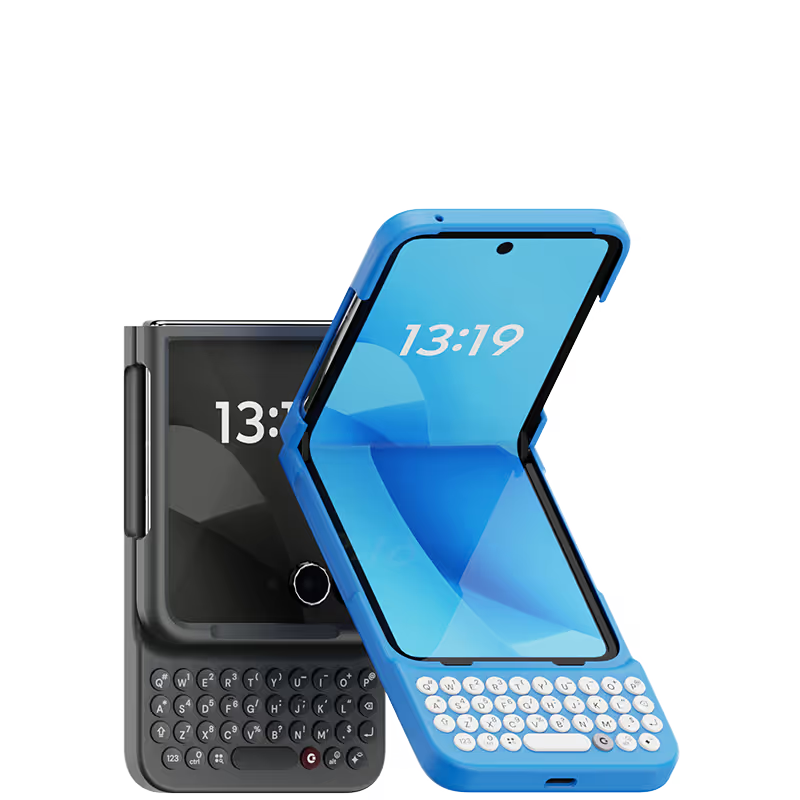



I always thought physical keyboards were a thing of the past for mobile devices. But the Clicks Keyboard has changed my mind. It transforms my iPhone into a true productivity machine. The typing experience is fantastic, and the keyboard layout is almost perfect. Plus, the case protects my phone from everyday bumps and scratches. A win-win all around!

Not gonna lie, I was a little slow on Clicks the first few days and almost was going to return it. It's nice that you can still use the touchscreen if you want though so you don't actually have to type on the buttons all the time. I gave it a chance though and now I'm typing fast without even looking at the keyboard. Just took me a bit to get used to it.
Having a keyboard again to maximize the screen is absolutely essential. Felt programmed for years to think otherwise. Couldn't be more grateful for this to be in my hands.
I love this keyboard. Less typos and the size is not that big of an issue. Highly recommended
love this thing. Went without it for a few days and my phone felt crowded with the on-screen keyboard. Clicks keyboard feels lovely and tactile to type on.
I love Clicks when I saw it from MrMobile [Michael Fisher] Youtube . It was love at first sight So when we got the order, immediately use it to our hearts content. there were days that we really need to adapt and learn but overall it really fun to use NOTE: if your using MAX version it is REALLY TALL
Attention, tech enthusiasts and keyboard warriors! Remember the nostalgic days of tactile typing on your mobile phones? The satisfying clickety-clack that accompanied every text message, email, and hastily written note? Relive those moments with Clicks for iPhone, a resurrection of the lost art of physical keyboarding. As a seasoned veteran of the mobile phone scene, I've witnessed the rise and fall of countless trends, but few have intrigued me like Clicks. This ingenious little add-on empowers you to transform your sleek touchscreen iPhone into a pocket-sized productivity powerhouse, enhancing your efficiency on the go. The Clicks keyboard is a marvel of engineering, with well-spaced keys that provide just the right amount of tactile feedback. Typing on it is like typing on a miniature laptop, but without the bulk or the awkward stares from fellow commuters. Sure, it takes a bit of getting used to. My thumbs initially felt like a fish out of water, flopping around in search of their digital home. But after a few days of practice, I was zipping through emails and social media posts with newfound speed and accuracy. And let's remember the sheer joy of hearing that satisfying click with every keystroke. It's a symphony of productivity, a rhythmic reminder that you're getting things done. Of course, there are a few minor quibbles. The Clicks keyboard adds a bit of bulk to your iPhone and makes it longer. But for those of us who prioritize function over fashion, these are minor sacrifices. So, if you're tired of hunting and pecking on your touchscreen keyboard or simply yearning for the tactile typing experience of yesteryear, give Clicks for iPhone a try. Your thumbs will thank you.
It has been awesome to use Clicks. It has given me the entire screen space back and improved the typing speed. Also, it gets me lot of attention from others.


.avif)

.webp)


