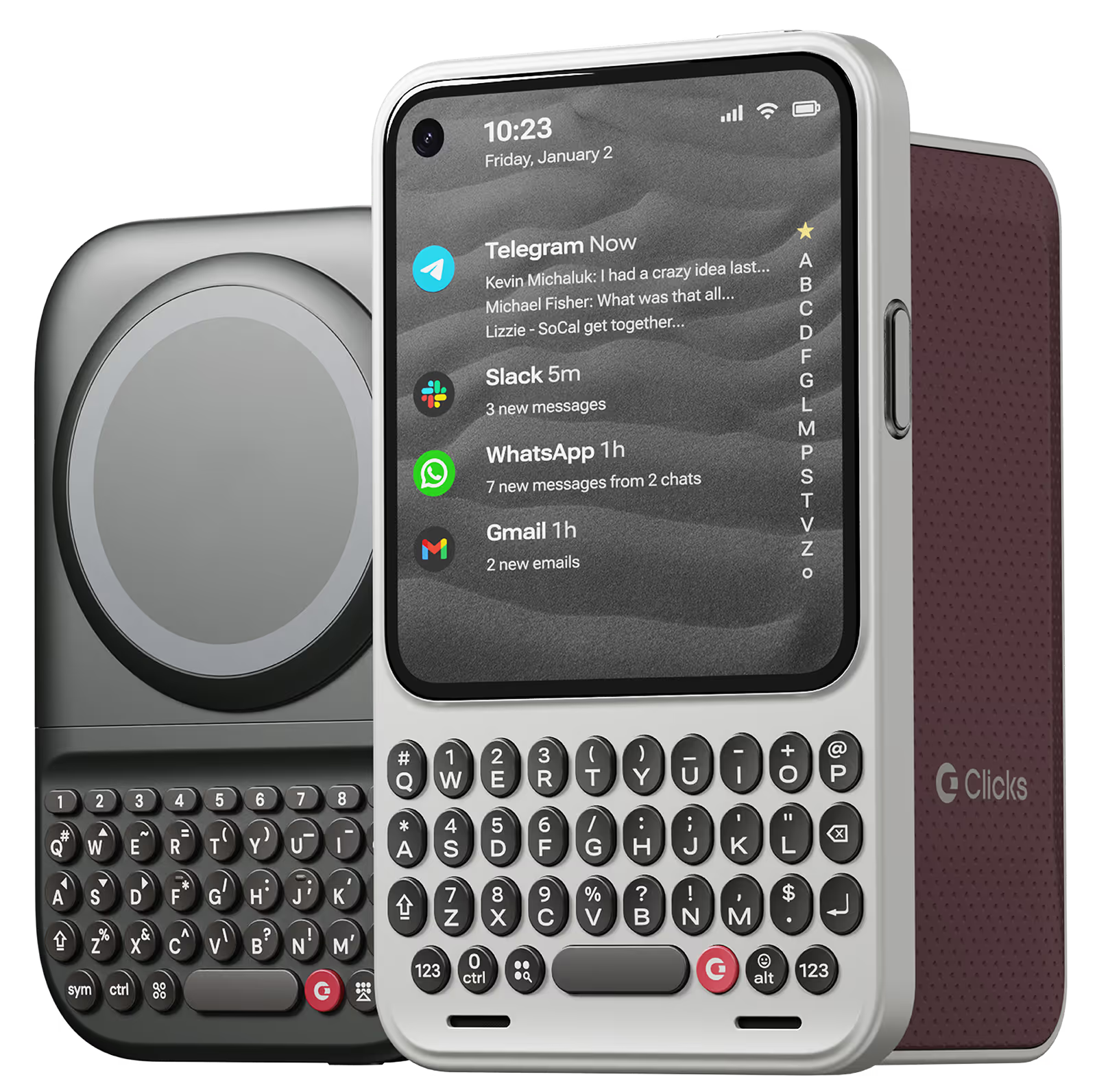
Save on Communicator & Power Keyboard until March 15

Why you'll love Clicks.

1
Feel satisfying real buttons
Pressing real buttons and hearing that little clicking sound feels more natural and rewarding.
Replay
2
Elevated premium protection
Brushed metal side keys, a microfibre lining, and a new enclosure that feels great while adding protection inside and out.
Replay
3
See more screen
Free your screen, with 50% more usable display to work, play, surf, chat and engage with your content.
Replay
4
Take action, faster
Launch customized shortcuts at the push of a button. Personalize your keyboard to control your home, launch apps, text or call contacts.
Replay
5
Keep your laptop at home
Make more happen right from your phone without needing to crack open your laptop.
Clicks for iPhone
Available for iPhone 16, 15 and 14.
In stock & shipping now.
Buy Now
Clicks for Pixel
Pixel-perfect productivity.
Available now.
Buy Now
Clicks for Razr
Pocket-sized. Power-packed.
Available now.
Buy Now

Buttons with benefits.

More Screen

Get 50% more usable display to work, play, surf, chat and engage with your content.

Customizable Shortcuts

Launch custom actions at the push of a button.

Powerful Productivity

Real buttons that help you work smarter while away from your desk.

What Clicks users are saying.

Based on 5,328 user reviews.
Andreas P.
Clicks for iPhone 15

I have been using the Clicks keyboard for almost a year now, and it has changed my life. It's smart, well conceived and really changes the way you interact with your iPhone.

Visit source
Ian H
Clicks for iPhone 15

Having a real keyboard again is fantastic. I can touch type with so few errors again. The feedback from the buttons is great. The keyboard itself is a perfectly ergonomically designed. A great great all round product.

Visit source
Nicholas T.
Clicks for iPhone 15 Pro

A bit hard to hold. Possible to shift the weight more bottom?

Visit source
Kristine Chipman
Clicks Keyboard for Razr+ (2024)

Literally took the keyboard out of the box and started using it. No installation required, just start clicking away.

Visit source
André B.
Clicks for iPhone 15

I have enjoyed using the Clicks "Precision Typing Instrument" immensely - Typing and browsing with "Clicks" is so much more satisfying than typing on glass. It's also beautiful, well built and fits my Iphone 15 perfectly.

Visit source
Karl Eklund C
Clicks Keyboard for iPhone 16

I really like how user friendly it is Just plug and play

Visit source
Erika F.
Clicks for iPhone 14 Pro

I love the feedback of real buttons. It's so satisfying! Instead of getting my laptop out for longer messages, now I can just use my iPhone with Clicks.

Visit source
Will M.
Clicks for iPhone 15 Pro

Clicks is a lifesaver for remote work on the go. One of the most frustrating parts of working remote is still feeling glued to a laptop. If there's an urgent email or message I can respond from my phone but it can get tricky to accurately respond when I have to keep juggling reading the entire message or typing. Aside from any practical justification Clicks is just plain cool. It feels good to well click!

Visit source
Andreas P.
Clicks for iPhone 15

Clicks makes real typing on an iPhone a reality. Keeping your train of thought while typing, and muscle memory kicking in is just wonderful. I had been looking for something like this for years. Wouldn't be without it!

Visit source
Augustine Lau
Clicks Keyboard for Razr+ (2024)

This is the first time I've ever used a physical thumb keyboard on a phone before (never used a blackberry), and I can definitely see the appeal! Even if I am now typing slower, I am typing much more accurately without needing to rely on the terrible auto correction algorithms, I think my effective typing speed is more or less similar without having to correct my mistakes so often. It makes my razr 50 ultra a truly unique device, honestly the clicks keyboard was made for this phone. Unlike slab phones, it doesn't make your phone look comically tall as you can fold the phone in half and the cover screen is large enough to use for most apps. Even with the clicks keyboard, when folded, it is still short

Visit source

Clicks has you covered.
Try for 30 days.

It takes a week or two to get used to typing on real buttons –  you’ll need a little bit of patience and perseverance. Trust our tens of thousands of customers, it’s so worth it!

If it’s just not for you, we’ll give you your money back, no questions asked.